
Product brochureNovember 2026
Inside the cloud phone system
Extensions, voice menus, voicemail, texting and video meetings on one account, with a pool of minutes the whole team draws from. Hosted in Canada. From $13.99 CAD a month.
Download PDF 1.3 MB
- CAD a month, Solo plan
- $13.99
- Free trial on every plan
- 14 days
- Off with annual billing
- 20%
The main number rings one desk, and when that person is at lunch the customer gets a voicemail nobody hears until tomorrow. Staff hand out personal mobile numbers to fill the gap. And the quote to fix it prices every employee as a seat, including the two who answer the phone twice a month.
Every person gets a short extension that rings their desk phone and browser phone together. A voice menu greets callers and sends them to a ring group, a queue or a mailbox, and each site's opening hours decide what happens after closing. Voicemail arrives by email with the recording attached. You pay one account price that covers a bundle of users and a shared pool of minutes.
Each plan covers a bundle of users and one minute pool everyone shares; quiet lines don't strand minutes the busy ones need.
Ring a whole team at once, hold callers in a queue, and send after-hours calls to a menu, mailbox or mobile number.
Add a user, change a greeting or close early from the portal. No technician visit, no hardware beyond phones you choose.
What happens when a customer rings
8:45 am
The greeting answers
A customer dials the main number. The voice menu plays your recorded greeting and offers 1 for sales, 2 for accounts.
8:45 am
One key, whole team
Pressing 1 sends the call to the sales ring group. Every member's desk phone and browser phone ring at once.
8:46 am
Nobody free yet
After 20 seconds unanswered, the group's fallback runs: the call goes to the sales voicemail box and the caller leaves a message.
8:47 am
Message in your inbox
The message is emailed to every member of that shared mailbox, recording attached, so whoever arrives first can call back.
Every caller gets a route to a person
- InboundCaller
dials your business number
- HoursOpen: voice menu
greeting, then press 1 or 2
Closed: night serviceafter-hours greeting or on-call mobile
- TeamRing group
desk phones and browser phones ring together
- OutcomeAnswered
by the first person free
No answerfalls back to the group mailbox
- Follow-upEmail
message with the recording attached
A whole phone system on one account
Call handling
Point a number at a team, not a person, and decide what happens when nobody picks up.
- Ring groups with five ring strategies
- Call queues with hold music, agent tiers and place in line
- Forwarding rules: always, busy, no answer, unavailable
- Attended and blind transfer
- Fallback to voicemail, extension or outside number
Menus & hours
A recorded menu answers first, in English or French, and knows when each site is closed.
- Typed text-to-speech or uploaded greetings
- Keypad options, sub-menus and dial-by-name directory
- Time conditions on shared schedules and holidays
- Site opening hours, holidays and one-tap early close
- On-screen simulator to test before going live
Voicemail
Messages reach you by email with the recording, and stay in the portal and on the handset.
- Email delivery with the recording attached
- Message waiting light on desk phones
- Shared mailboxes that email every member
- Dial *97, or *98 with a PIN
- English and French transcription on Professional and above
Meetings & chat
Video, audio conferencing and team messaging on the same account and sign-in as the phones.
- Six-person browser video with screen sharing
- Guests join by link and six-digit PIN
- In-meeting chat for hosts and guests
- Conference bridges with lock, mute and remove
- Direct, group and channel team chat
Business texting
Customers text the number on your van or invoice, and the whole team sees the thread.
- Two-way SMS on business numbers
- Shared team inboxes with view-only seats
- Templates with fill-in name fields
- STOP and ARRET replies suppressed automatically
- Auto-replies after hours or on a keyword
Phones & front desk
A browser phone, desk phones that configure themselves, and a switchboard for whoever answers the main line.
- Browser phone, nothing to install
- Desk phones auto-provisioned by MAC over HTTPS
- Operator board with live extension status
- Call park with ring-back, pickup, paging, intercom
- Your own hold music, per account or extension
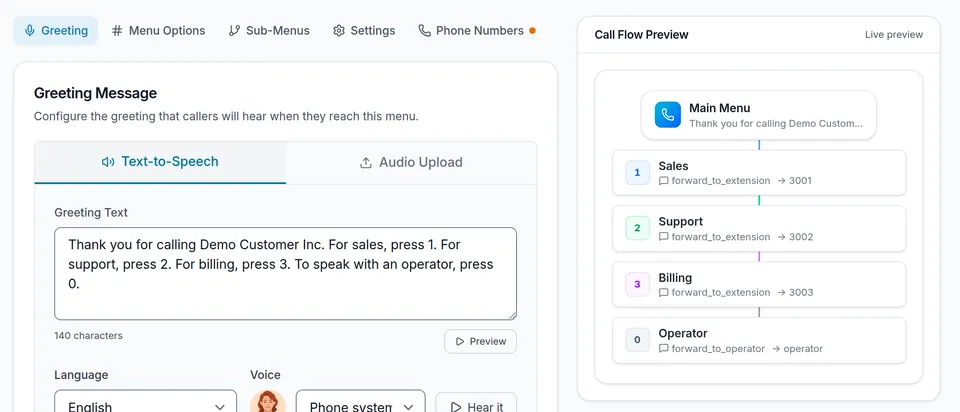
Menus & hours, as you build them
A recorded menu answers first, in English or French, and knows when each site is closed.
Screen from the ReliaRing voice menu editor, shown with demonstration data.
The details buyers ask about
Extensions for everyone
A short extension per person, four digits by default, ringing all their registered devices at once.
Ring groups
Ring a team at once, in sequence, round robin, least recent or random; members' own forwarding is skipped.
Call queues
Callers hear their place in line on joining and every 30 s to 5 min (1 min by default, or off); the next caller is left alone.
Voice menus
Typed or uploaded greeting, keypad options, sub-menus and a dial-by-name directory.
Night service
Per-site opening hours and holidays, in the site's own timezone, with one-tap early close.
Voicemail to email
Each message emailed with the recording attached; the desk phone's message light comes on.
Browser phone
Calls, hold, blind and attended transfer in your browser. Nothing to install.
Business texting
Two-way SMS on your business numbers, with shared team inboxes and saved templates.
Video meetings
Up to six people in a browser with screen sharing and chat; guests join by link.
Operator switchboard
See every extension's live status; click to call, answer, transfer or park from the browser.
Desk phone provisioning
Enter the MAC address; the phone fetches its own configuration over HTTPS on first boot.
E911 with 933 test
A dispatchable address per number, on-site alerts when 911 is dialled, and a 933 test call.
Five steps from signup to first call
Pick a plan
Choose the bundle that fits your headcount. Every plan starts with a 14-day trial.
Get your numbers
Choose a new local number, or transfer the numbers you already have.
Add your people
Invite each person and give them an extension, a mailbox and a direct number.
Build the call flow
Record a greeting, map the keys to ring groups, and set each site's opening hours.
Plug in and answer
Use the browser phone from day one; supported desk phones configure themselves when plugged in.
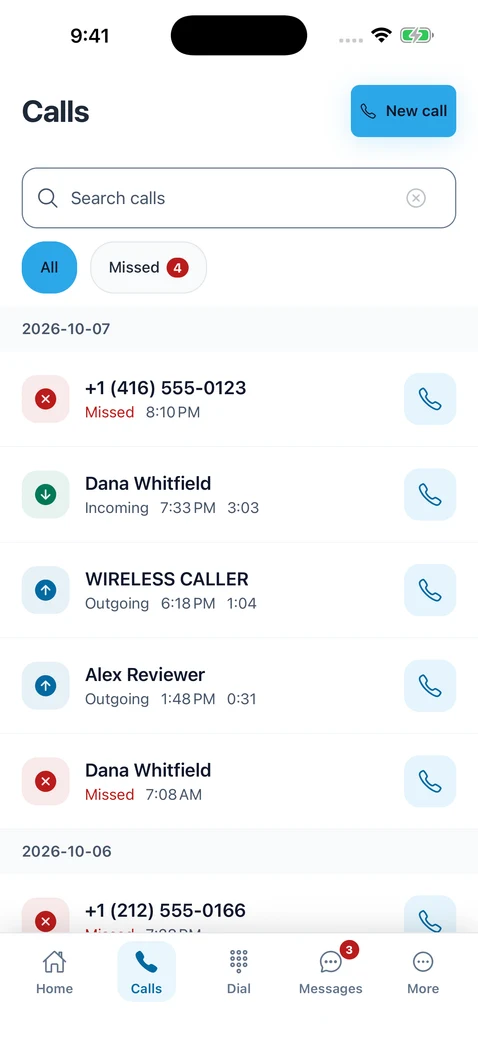
Three businesses, three call flows
Dental clinic
The main line opens on a bilingual greeting. Press 1 rings both front-desk phones; after six, night service sends callers to a shared mailbox that emails staff.
Trades contractor
Two in the office, six in trucks. The office ring group rings for 20 seconds, then falls back to the on-call mobile. Customers text the business number instead.
Accounting firm
Ten staff share 4,000 pooled minutes on Professional. In tax season the client line becomes a queue with hold music, and recorded calls open with a consent notice.
The better choice, in specifics
Shared bundle, not per-seat
One account price covers a bundle of users and a pooled minute allowance. Extra users are added at a published rate.
Hosted in Canada
Voice runs from Canada Central and Canada East, and call recordings are kept in Canadian cloud storage.
E911 you can test
Register a dispatchable address for each number. Dial 933 to confirm it without reaching a dispatcher.
Phone, text and video together
Calls, business texting, team chat, six-person video meetings and dial-in conference bridges sit on one account and one bill.
Specifications and safeguards
| Deployment | Cloud, hosted in Canada |
|---|---|
| Regions | Canada Central, Canada East |
| Extensions | 4 digits by default (2 to 8 configurable), unique per account |
| Ring timeout | 10–120 seconds per extension (default 20) |
| Device registration | SIP over TLS (port 5061) on current desk-phone models; browser phone over secure WebSocket |
| Browser phone | WebRTC softphone in the portal; nothing to install |
| Video meetings | Up to 6 participants on every plan |
- Call recording stays off until an administrator accepts the recording terms; recorded calls open with a spoken consent notice and write a consent log.
- Retention rules delete recordings after a set number of days or at a storage ceiling; a legal hold exempts recordings from every deletion path.
- Each hosted 911 or 933 call and each alert sent is logged, and outbound calling stays closed until the VoIP 911 limitations are accepted.
One price for the business, not per seat
Each plan covers a bundle of users and one pool of minutes and texts that everyone shares. Add people at the published rate when you grow.
| Per account, per month | Solo $13.99 CAD · $9.99 USD | Starter $41.49 CAD · $29.49 USD | Most popular Professional $132.00 CAD · $95.00 USD | Business $305.00 CAD · $219.00 USD | Enterprise $555.00 CAD · $399.00 USD |
|---|---|---|---|---|---|
| Users included | 1 | 3 | 10 | 25 | 50 |
| Maximum users | 3 | 10 | 25 | 250 | No limit |
| Each extra user (CAD / USD) | $13.99 / $9.99 | $13.83 / $9.83 | $13.20 / $9.50 | $12.20 / $8.76 | $11.10 / $7.98 |
| Pooled minutes per month | 300 | 1,200 | 4,000 | 9,000 | 16,000 |
| Pooled SMS segments per month | 50 | 200 | 750 | 1,750 | 3,000 |
| Local phone numbers included | 1 | 2 | 4 | 8 | 15 |
| Shared extensions included | 0 | 1 | 2 | 5 | 10 |
| Recording storage | 5 GB | 25 GB | 50 GB | 100 GB | 250 GB |
| Call recording | Not included | Included | Included | Included | Included |
| Voicemail transcription (English, French) | Not included | Not included | Included | Included | Included |
| Call sentiment analysis | Not included | Not included | Included | Included | Included |
| Voice menus, call queues, API access | Included | Included | Included | Included | Included |
- Extra users, Solo to Enterprise: $13.99, $13.83, $13.20, $12.20, $11.10 CAD ($9.99, $9.83, $9.50, $8.76, $7.98 USD) monthly.
- Shared extensions (lobby, boardroom, door phone): $6.99 to $5.49 CAD ($4.99 to $3.99 USD) each per month by plan.
- Overage: $0.028 CAD ($0.02 USD) per minute and per SMS segment.
- Calls to high-cost North American exchanges (most of Yukon, the Northwest Territories, Nunavut and Alaska) never use pooled minutes and are billed per minute; check any number with the rate lookup in the portal.
- Annual billing takes 20% off and is chosen in the portal. No setup fee on any plan.
- The 14-day trial includes 100 minutes and 25 SMS segments; one trial per account. We email you 3 days before it ends with the amount and how to cancel.
- Included numbers are local. Extra local numbers $4.95 CAD ($3.50 USD) a month; toll-free $6.95 CAD ($4.95 USD).
- Premium area codes such as 416 carry a $99.99 one-time setup fee and $29.99 a month.
- One E911 registration included per user and per shared extension; additional registrations $1.90 CAD ($1.35 USD) each per month.
- A 911 call from a number with no registered location carries a $100 CAD ($75 USD) cost-recovery fee.
- Transferring a number: $20 CAD ($15 USD) each, one time; typically 5 to 15 business days.
- Phone and email support on every plan, Monday to Friday, 6 a.m. to 6 p.m. Mountain.
- Supervisor listen, whisper and join on live calls is available on request; while it is on, inbound callers hear a 'may be monitored or recorded' notice.
ReliaRing is a brand of Tridacom IT Solutions Inc. Prices are in Canadian dollars unless marked USD, exclude applicable taxes, are current as of November 2026 and may change. Business signup accepts Canadian and US billing addresses. Number availability and supported destinations vary by service.